We have pretty much heard about SSL decryption and of malware hiding inside an encrypted traffic. A large amount of traffic in the internet is pretty much encrypted which basically means that bad things like malware, virus, ransomware can hide inside this encrypted traffic. If majority of these traffic are encrypted our Firewalls are not able to analyze these traffic which can easily infect our organization and the investment which we have done in these firewalls are wasted.
There does come around a solution for this and as my topic suggest SSL Decryption also know as Deep Packet Inspection as by some IT folks. The image that I have attached down below clearly suggest about what I am trying to explain. Using deep packet inspection, the firewall simply decrypts the encrypted traffic happening between client and server, inspects the content to find the threats and block them , then forwards it to the destination re-encrypting it .
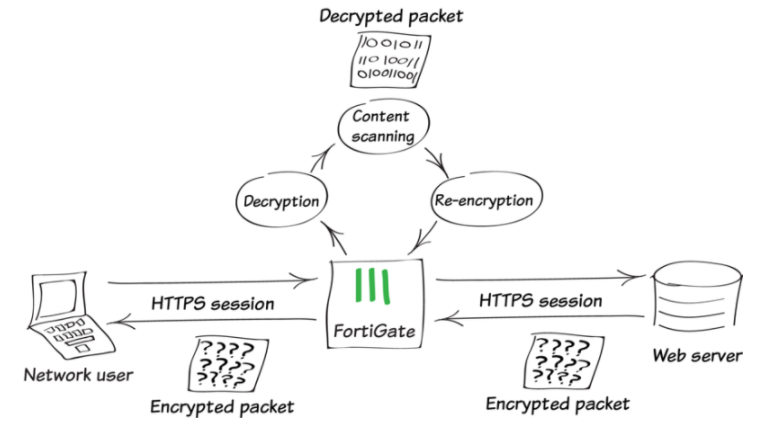
We will need to first setup the SSL/SSH inspection. There are 2 ways of doing deep packet inspection . One of them is for outgoing traffic also technically sometimes referred to as Source NAT and the other one is for incoming traffic referred to as Destination NAT.
Source NAT is usually the traffic the we are using for the purpose of surfing the internet from inside of an protected network to the outside . Destination NAT is used for provided application as a service to the customer. The SSL Certificate bundle of that particular service domain must be imported inside the FortiGate.
Exemption of certain web categories and addresses can also be done which we will talk about it later in the blog.


You can see in the policy named SOSYS-INTERNET under Security Profiles that we have used Anti Virus , IPS and custom-deep-inspection. Custom Deep Inspection will be applied to anyone that is trying to browse the internet from SOSYS-SUBNET.
Finally we will need to install the CA Certificate in the web browser of the end host client as a trusted root certificate.

Once we start browsing the website we can see the certificate we had imported and deep packet inspection has started working .


You can now clearly see the certificate Issued by is now by Geotrust not by Fortigate and therefore it is also not performing deep packet inspection for this particular site. This is usually done for some trusted websites like youtube, facebook and so on .
On my final note I would like to add that although these devices does do deep packet inspection and helps us find those malware inside the data sent but there does imply some down side as well. The performance of these firewalls does go down significantly because they need to decrypt the packet inspect the packet and re-encrypt it and send it towards the application server or towards the internet.
Comments
Post a Comment